🎧 Audio QR — A Real Music-Player Experience + Chapters, Brand Colours & Listen Analytics
Audio QR just got a major upgrade — not just new features, but a completely rebuilt landing page that feels like a proper music player. Turn any music track, podcast episode, or audiobook chapter into a real listening experience, style it in your brand, and see exactly how visitors listen.
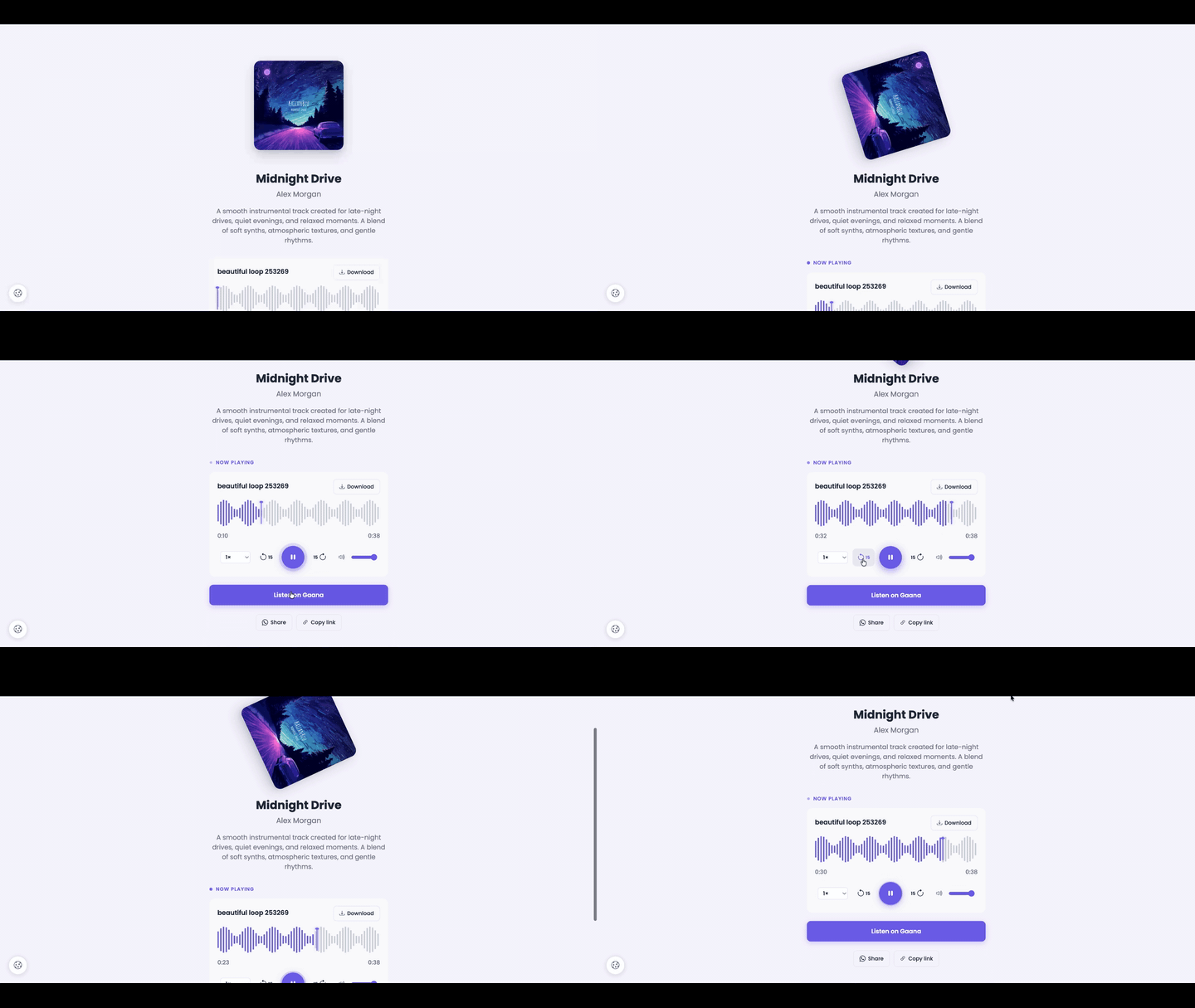
What's included:
✅ Music-player experience — Cover art spins slowly like a vinyl record while audio plays. The play button glows with a subtle breathing halo. A "Now Playing" pill with a pulsing dot appears above the player. Animated equalizer bars replace the track number on the actively playing track in the playlist. Every visual state says "this is alive".
✅ Playback controls — Skip back 15s, skip forward 15s, playback speed from 0.5× to 2× (perfect for podcasts), volume slider, and a big play/pause button — all in one clean row.
✅ Interactive waveform — The whole track shown as a clean waveform with a visible playhead thumb at the current position. Tap anywhere to jump to that moment. Hover over the waveform to see exactly where the click will land before committing.
✅ Chapter markers — Add chapters to any track in MM:SS Label format (like 0:00 Intro, 12:30 Q&A). Visitors tap any chapter to jump straight there. Great for podcasts, audiobooks, sermons, training recordings.
✅ Brand colours + font (auto-contrast) — Pick an accent colour, a background colour, and a Google Font. Ten preset chips plus custom hex for both. Text automatically inverts to stay readable on any background — dark bg gets light text, light bg gets dark text. No more invisible titles on dark colours.
✅ Remembers your place — Visitors can leave and come back mid-track — playback resumes exactly where they stopped. Each playlist track shows a thin progress bar, so listeners see how far they got through every episode.
✅ Share buttons — Built-in WhatsApp share + Copy Link buttons at the bottom of every landing page. Free viral loop, zero setup.
✅ Listen analytics dashboard — See total plays, completions, unique listeners, chapter jumps, per-track listen time, and where visitors dropped off. Recent Playback Events log shows every play, pause, and chapter jump in real time.
Existing Audio QR codes automatically get the new player (vinyl spin, playhead thumb, controls, listen analytics, resume playback, share buttons, auto-contrast). Chapters and brand colours are opt-in — add them when you're ready.
Try it: Create/Edit any Audio QR → add tracks → open a track → add chapters in the new Chapters box → scroll to Page Customization → save. Then scan and watch the player come alive.
 Powered by ProductLift