🧱 Multi-Link — 20+ New Block Types: Products, FAQ, Newsletter, Countdown & More
Major upgrade to Multi-Link. Your bio page is no longer just a list of links — drop in product cards, FAQs, newsletters, signups, countdowns, contact buttons, image galleries, embedded music, and 15+ more block types. Build a real landing page
from your bio link.
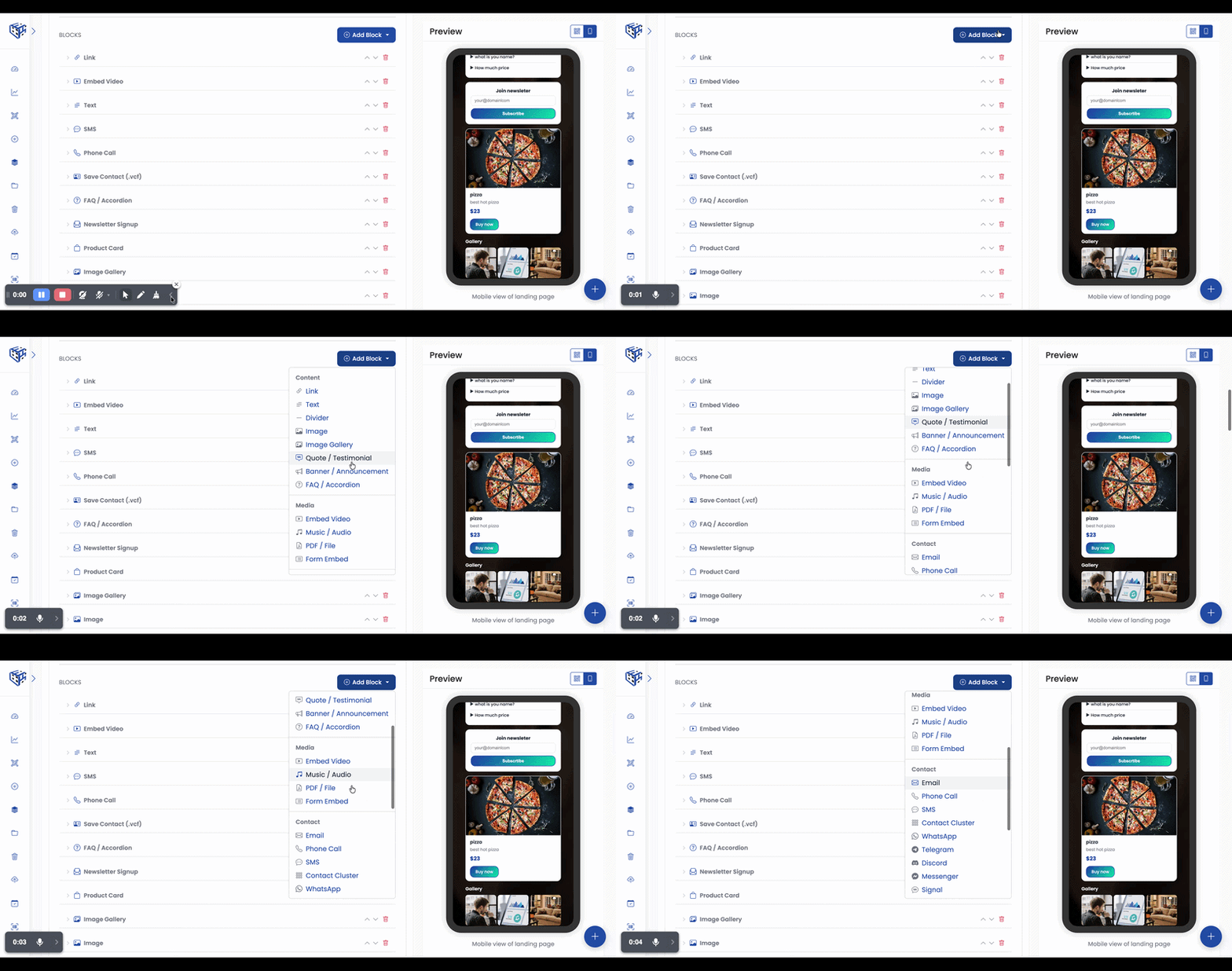
What's included:
✅ Rich Text — Format text with headings, bold, italic, lists, and links right inside the page.
✅ Image & Image Gallery — Single image or a clean grid. Tap any image for a full-screen lightbox.
✅ Product Card — Sell from your bio. Photo, title, price, and a Buy button.
✅ FAQ / Accordion — Answer common questions inline. Tap to expand each one.
✅ Newsletter Signup — Collect emails into your Multi-Link Leads dashboard, tagged separately from the "Get in touch" form so you know which form they came through.
✅ Countdown Timer — Live counter to launch, sale, or event.
✅ Quote / Testimonial — Customer reviews with optional photo, name, and role.
✅ Banner / Announcement — Eye-catching callout in your brand colour with a call-to-action.
✅ Music / Audio — Spotify tracks, Apple Music, SoundCloud players embedded inline.
✅ PDF / File Download — Share a brochure, menu, or guide. Downloads directly to the visitor's device.
✅ Form Embed — Typeform, Google Forms, Tally embedded right on the page.
✅ Chat blocks — WhatsApp, Telegram, Discord, Messenger, Signal — one-tap to open any messaging app.
✅ Save Contact (.vcf) — Visitors save your contact details to their phone in one tap.
✅ Map / Location — Show your address with one-tap directions in Google Maps.
✅ Contact Cluster — All your contact methods (call, SMS, WhatsApp, email, Telegram, etc.) as compact icons in a single block.
✅ Payment / Tip Jar — Stripe, PayPal, Buy Me a Coffee, UPI.
✅ App Download — iOS and Android store buttons side by side.
✅ Crypto Wallet — Wallet address with one-tap copy.
✅ Social Cluster — Single row of your social media icons.
✅ Divider — Visual separator between sections.
Existing Multi-Link QR codes are not affected — these only kick in when you add the new blocks.
Try it: Create/Edit any Multi-Link QR → click Add Block → pick from Content / Media / Contact / Commerce / Engagement categories → save.