🔗 Multi-Link — Turn Bio Scans Into Leads
Major upgrade to Multi-Link. Your bio page can now collect leads — visitors tap a small "Get in touch" button and leave their details, every lead lands in your dashboard, and you can pipe them straight to your CRM.
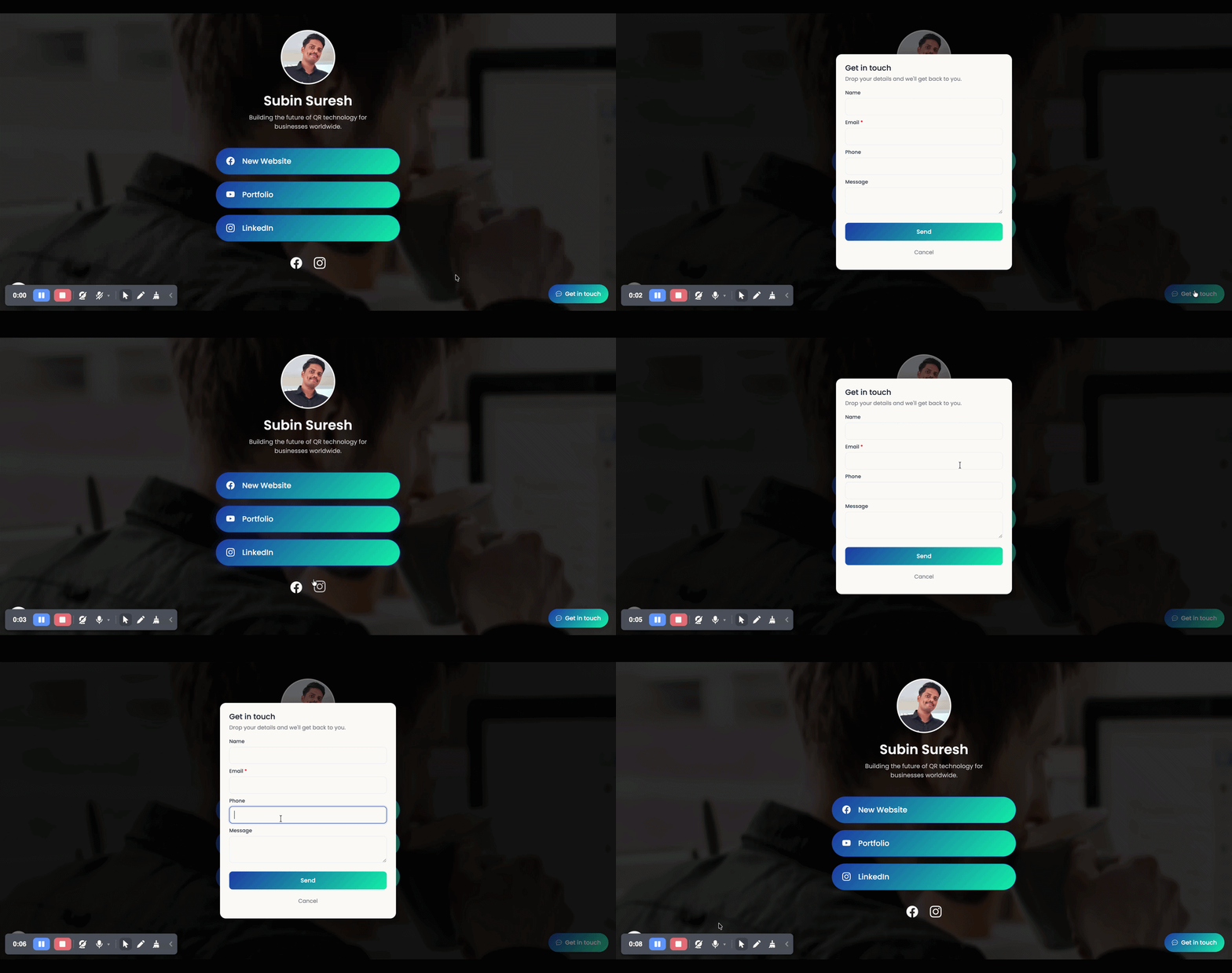
What's included:
✅ Contact form on your bio page — A small "Get in touch" button sits at the bottom of your Multi-Link page. Tap it, and a form opens. Visitor enters name + email + optional phone + message. You get a notification email, and the lead lands in your dashboard.
✅ Fully customisable form — Edit the page button label, form title, description, submit button text, and privacy text. Show or hide phone and message fields.
✅ Leads dashboard — Total / Unread / This Week stats, filter, CSV export, mark read/unread, delete.
✅ Send leads to your CRM — Flow every Multi-Link lead to your CRM, Zapier, HubSpot, or any tool that accepts a webhook. Set one URL for the workspace, or a different URL per Multi-Link.
Existing Multi-Link QR codes are not affected — these only kick in after you turn them on.
Try it: Create/Edit any Multi-Link QR → scroll past Social Media Profiles → toggle "Enable contact form" → customise → save.