🎨 Page Builder — New QR Code Type with Notion-Style Editor
We've added a brand new QR code type: Page Builder.
Build rich, beautiful landing pages using a modern Notion-style block editor — right inside ElkQR.
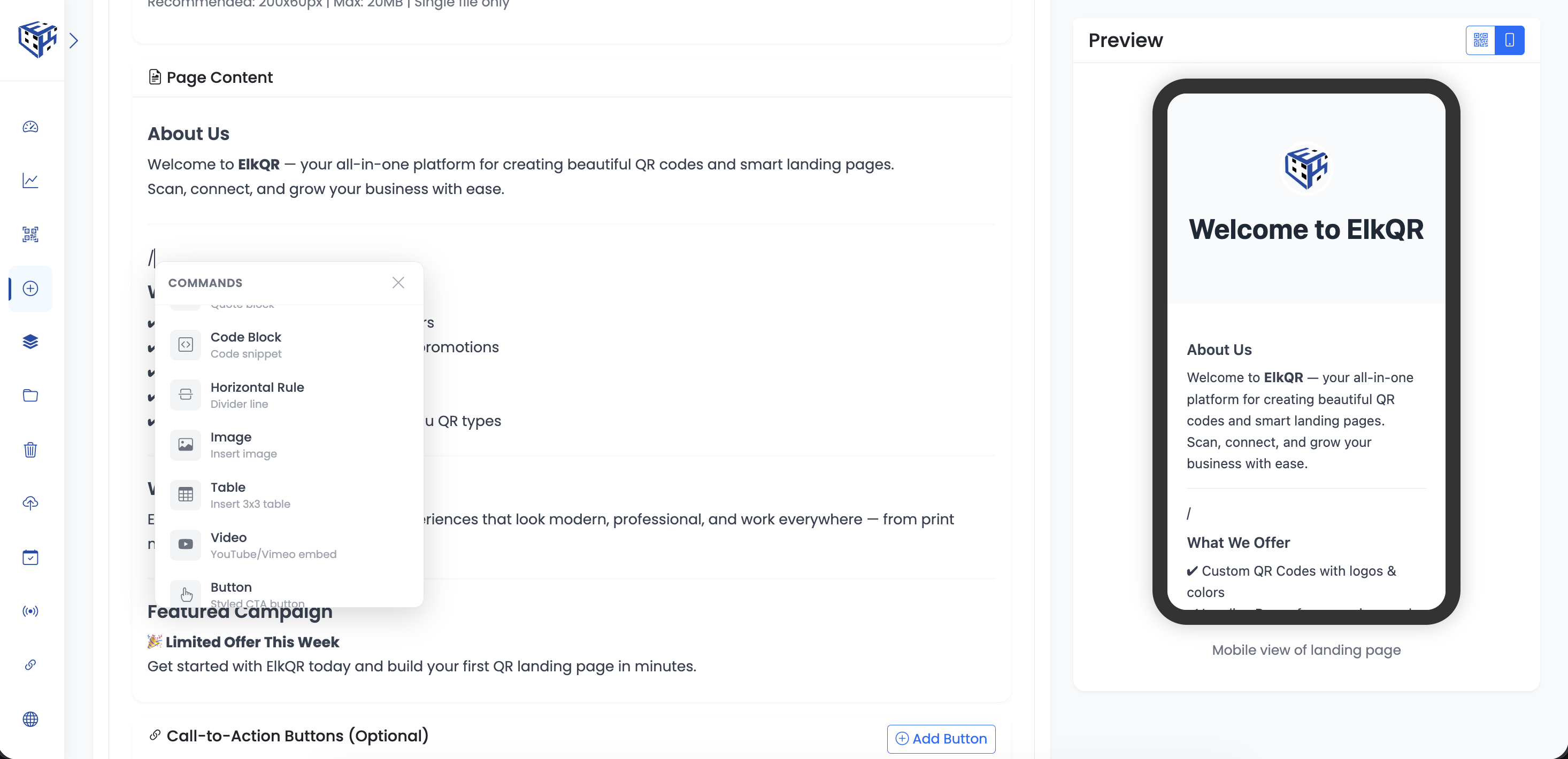
What's included:
✅ Slash commands — Type / to insert any block instantly
✅ 14 block types:
• Headings (H1, H2, H3)
• Bullet & Numbered Lists
• Blockquote & Code Block
• Horizontal Divider
• Image
• Table (add/remove rows & columns via right-click)
• YouTube/Vimeo Video Embed
• Styled CTA Button (preset colors + custom hex)
• Two-Column Layout
• Callout Box (Info / Warning / Success / Error)
✅ Header section with title, subtitle, logo & background image
✅ Contact information & social media links
✅ CTA buttons section
No toolbars to scroll to. Just type / and build.
📌 Note: The old Landing Page Builder will be deprecated soon. It was built with Quill editor which had formatting bugs and limitations we couldn't resolve. Existing landing page QR codes will continue to work and can still be edited — but for new pages, use the Page Builder.
Try it: Create QR Code → Page Builder